Premium Plan Details
For a comfortable image protection experience!
Batch Processing
Upload up to 100 images at once and apply the same logo and settings to all of them at once. Available for download as a ZIP file after processing.
Hidden Logo Feature (Paid Plan Only)
Embed a logo or signature in a way that is invisible on the image. It will not be noticed during normal browsing, but you can confirm it with a dedicated tool. Even if an image is reprinted without permission, it is strong evidence to prove "whose image it is."
AI Learning Prevention Features
* Even though it is technically difficult to prevent AI learning 100%, combining the following processing will act as a strong deterrent.
🔍 Embed anti-AI invisible text (NoAI, NoML, etc.)
Embed text that refuses AI learning, such as "NoAI", at a level that is difficult to discern with the naked eye. Even if AI learns, traces of the watermark may remain on the output image, acting as evidence of unauthorized learning.
🪄 EXIF Info (NoAI Tag)
Adding "NoAI" to the creator, copyright, and program name can reduce the chance of the image being used for AI learning.
🎨 Color Shift Processing
By subtly shifting the color tone of the image, the color features are intentionally altered when an AI learns. This aims to reduce accuracy as training data while making minimal impact on image quality.
📡 Add Noise
Add subtle noise that is hard for people to perceive. It hinders AI's feature extraction and serves as a deterrent to being copied directly and used for training.
🔲 Grid Pattern
Overlay a thin grid pattern that does not impair visibility. This reduces the usefulness of an image as a dataset for AI image recognition models directly.
* You can cancel anytime; benefits remain available until the end of the period.
✓ Unlock all features: Batch processing, Hidden Logos, and AI protection
✓ Secure Stripe payment and safe account management
✓ Privacy-focused. No information other than email is acquired
Actual Protection Result
An example using premium features on the "Golden Crab" image.

1. Original (Unprocessed)
The image before protection. As it is, it is subject to AI learning and unauthorized reproduction.

2. Protected (All Features On)
Invisible text, noise, grids, etc. have all been applied. Differences are barely noticeable to the naked eye.
* Using default 3%. You can adjust text and grid opacity.
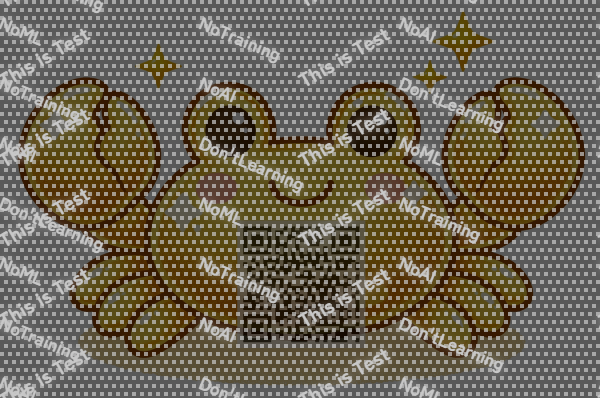
3. Checked with Magic Magnifier
When passed through the "Magnifier" feature, the hidden "No AI" text and grid patterns emerge.
* The preview emphasizes this for better visibility. You can also confirm the text on actual protected images by setting contrast to maximum and shadow to minimum (-100) with default OS photo apps.
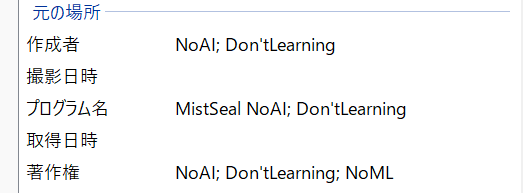
4. Behind the Data (NoAI Tag)
Metadata such as "NoAI; Don't Learning" is strongly written into the EXIF.
* EXIF embedding is technically supported for JPEG format (jpg, jpeg) only. If you upload a PNG image and enable "Add NoAI tag", it will be automatically converted to JPEG format.
* Actual protection effectiveness varies depending on the AI model.
⚠️ Strict Warning on Misuse
Program falsification, misuse of Premium features leveraging system vulnerabilities, or any kind of unauthorized access is strictly prohibited. If we detect such acts, we will charge a penalty constraint worth 1,000,000 JPY according to our Terms of Service, followed by taking legal actions including reporting to police authorities.
詳細は Privacy Policy をご確認ください。